
From Habitat Dex to Shopping List: how to plan and track any build
By Nicoletta· Published 6/20/2026
How the Habitat Dex, Build Queue, and Shopping List connect into one planning workflow, so you can go from "I want that Pokémon" to a single gathered materials list in a few taps.
Pokopia Companion connects three tools into one planning workflow: the Habitat Dex, the Build Queue, and the Shopping List. Once you understand how they link together, planning a new build goes from scattered to sorted in a few taps.
Step 1: Find your habitat
Open the Habitat Dex and browse or search for the habitat you want to build. You can filter by status (All, To do, Done), sort by number or name, and tap any row to open the full detail.
The detail shows you everything in one place: which Pokémon live there, every item and material the habitat needs, and a live tick list you can check off as you gather.
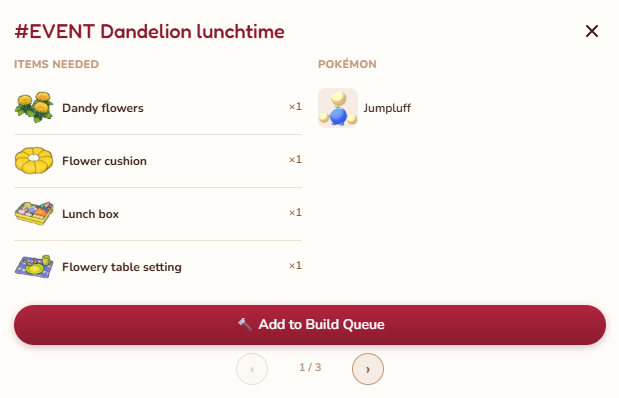
Step 2: Add it to your Build Queue
When you find a habitat you want to work on, tap the + button on its row, or use the button inside the detail view, to add it to the Build Queue. It takes one tap. The queue remembers your order and you can drag to reprioritise.
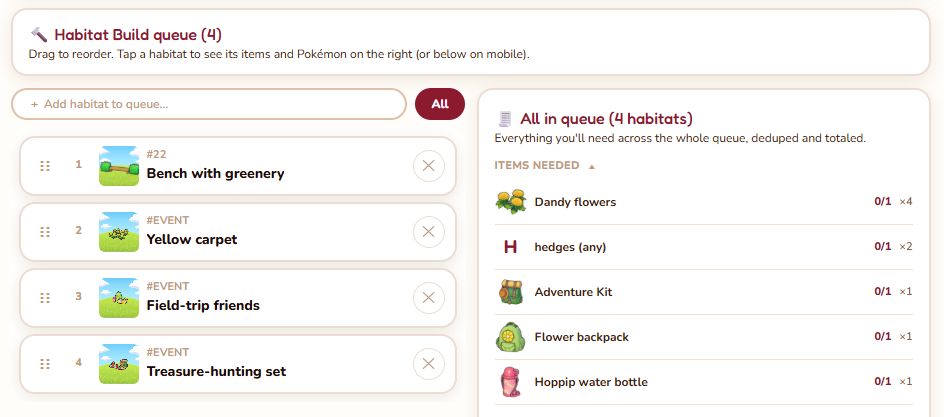
Step 3: Let the Shopping List do the work
Open the Shopping List. It reads every habitat in your Build Queue and combines all the required materials into one merged list. If two habitats need the same item, the quantities add up automatically. No spreadsheet needed.
Tick items off as you collect them in-game. The Shopping List updates in real time and syncs across your devices if you are signed in.
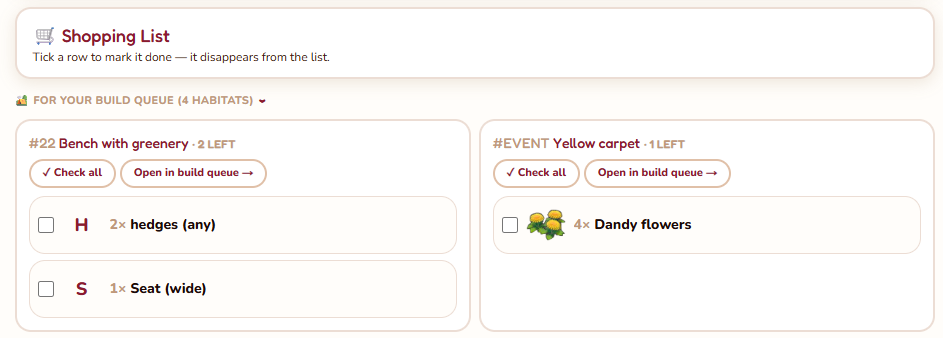
Step 4: Mark it done
Once a habitat is built, mark it as done in the Habitat Dex. It moves out of the To Do filter so your list stays clean, and it no longer contributes to the Shopping List totals.
That is the full loop. Find it, queue it, gather it, check it off.